PolyDataFilters.curvature#
- PolyDataFilters.curvature(curv_type='mean', progress_bar: bool = False)[source]#
Return the point-wise curvature of a mesh.
- Parameters:
- curv_type
str, default: “mean” Curvature type. One of the following:
"mean""gaussian""maximum""minimum"
For
"maximum"and"minimum", points where the discrete Gaussian and mean curvatures are inconsistent are assigned the mean curvature.- progress_barbool, default:
False Display a progress bar to indicate progress.
- curv_type
- Returns:
numpy.ndarrayArray of curvature values.
Examples#
Download Python source code | Download Jupyter notebook
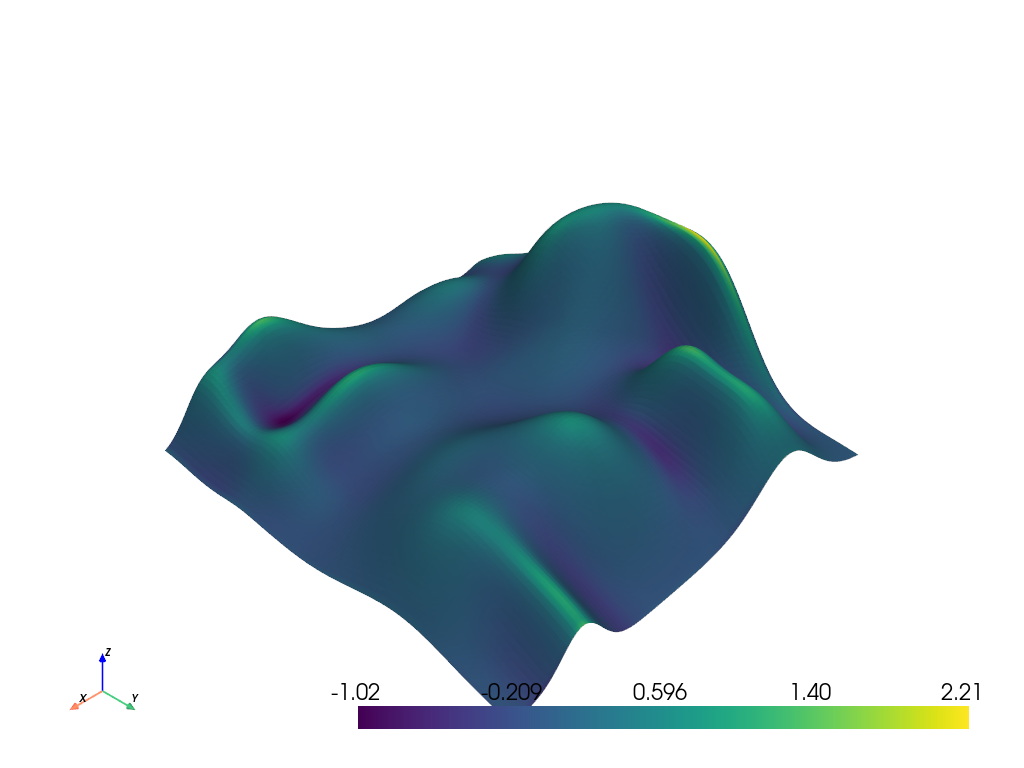
Calculate the mean curvature of the hills example mesh and plot it.
>>> from pyvista import examples
>>> hills = examples.load_random_hills()
>>> curv = hills.curvature()
>>> hills.plot(scalars=curv)
Show the curvature array.
>>> curv
array([0.20587616, 0.06747695, ..., 0.11781171, 0.15988467])
Used In#
Gallery Examples