DataObjectFilters.rotate#
- DataObjectFilters.rotate(
- rotation: RotationLike,
- point: VectorLike[float] | None = None,
- transform_all_input_vectors: bool = False,
- inplace: bool = False,
Rotate mesh about a point with a rotation matrix or
Rotationobject.Note
See also the notes at
transform()which is used by this filter under the hood.- Parameters:
- rotation
RotationLike 3x3 rotation matrix or a SciPy
Rotationobject.- point
VectorLike[float],optional Point to rotate about. Defaults to origin.
- transform_all_input_vectorsbool, default:
False When
True, all input vectors are transformed. Otherwise, only the points, normals, and active vectors are transformed.- inplacebool, default:
False Updates mesh in-place.
- rotation
- Returns:
- output
DataSet|MultiBlock Rotated dataset. Return type matches input.
- output
Examples#
Download Python source code | Download Jupyter notebook
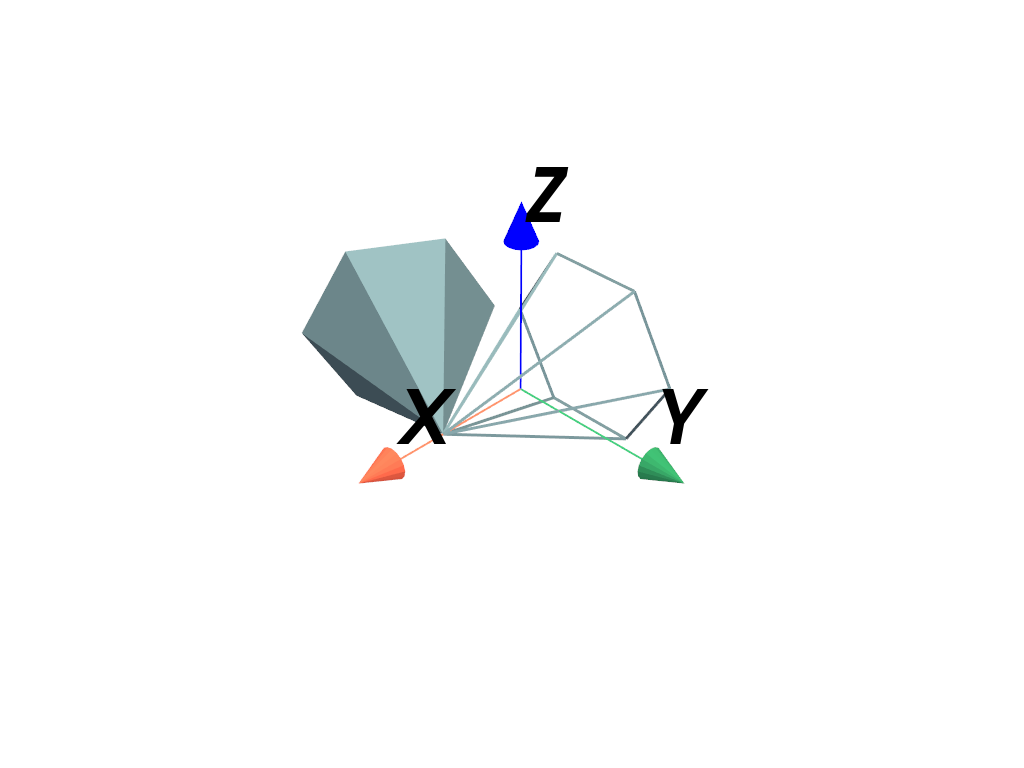
Define a rotation. Here, a 3x3 matrix is used which rotates about the z-axis by 60 degrees.
>>> import pyvista as pv
>>> rotation = [
...     [0.5, -0.8660254, 0.0],
...     [0.8660254, 0.5, 0.0],
...     [0.0, 0.0, 1.0],
... ]
Use the rotation to rotate a cone about its tip.
>>> mesh = pv.Cone()
>>> tip = (0.5, 0.0, 0.0)
>>> rot = mesh.rotate(rotation, point=tip)
Plot the rotated mesh.
>>> pl = pv.Plotter()
>>> _ = pl.add_mesh(rot)
>>> _ = pl.add_mesh(mesh, style='wireframe', line_width=3)
>>> _ = pl.add_axes_at_origin()
>>> pl.show()
See Also#
pyvista.Transform.rotateConcatenate a rotation matrix with a transformation.
