DataObjectFilters.scale#
- DataObjectFilters.scale(
- xyz: float | VectorLike[float],
- transform_all_input_vectors: bool = False,
- inplace: bool = False,
- point: VectorLike[float] | None = None,
Scale the mesh.
Note
See also the notes at
transform()which is used by this filter under the hood.- Parameters:
- xyz
float|VectorLike[float] A vector sequence defining the scale factors along x, y, and z. If a scalar, the same uniform scale is used along all three axes.
- transform_all_input_vectorsbool, default:
False When
True, all input vectors are transformed. Otherwise, only the points, normals, and active vectors are transformed.- inplacebool, default:
False Updates mesh in-place.
- point
VectorLike[float],optional Point to scale from. Defaults to origin.
- xyz
- Returns:
- output
DataSet|MultiBlock Scaled dataset. Return type matches input.
- output
Examples#
Download Python source code | Download Jupyter notebook
>>> import pyvista as pv
>>> from pyvista import examples
>>> mesh1 = examples.download_teapot()
>>> mesh2 = mesh1.scale([10.0, 10.0, 10.0], inplace=False)
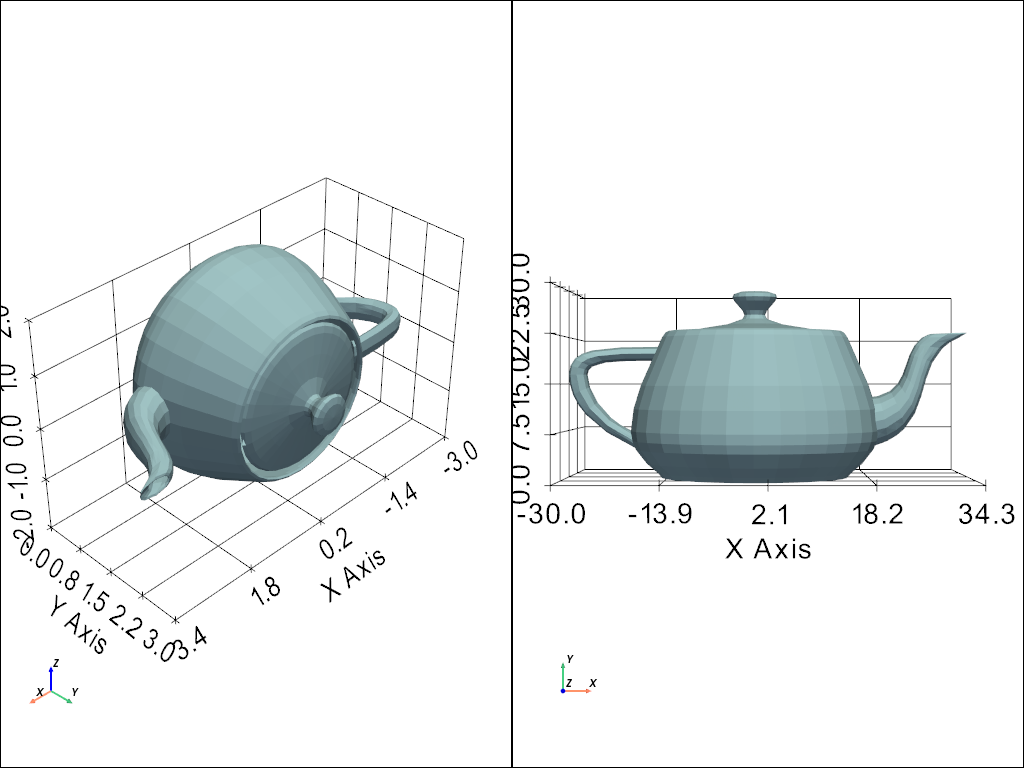
Plot meshes side-by-side
>>> pl = pv.Plotter(shape=(1, 2))
>>> # Create plot with unscaled mesh
>>> pl.subplot(0, 0)
>>> _ = pl.add_mesh(mesh1)
>>> pl.show_axes()
>>> _ = pl.show_grid()
>>> # Create plot with scaled mesh
>>> pl.subplot(0, 1)
>>> _ = pl.add_mesh(mesh2)
>>> pl.show_axes()
>>> _ = pl.show_grid()
>>> pl.show(cpos='xy')
See Also#
pyvista.Transform.scaleConcatenate a scale matrix with a transformation.
pyvista.DataObjectFilters.resizeResize a mesh.
Used In#
Gallery Examples